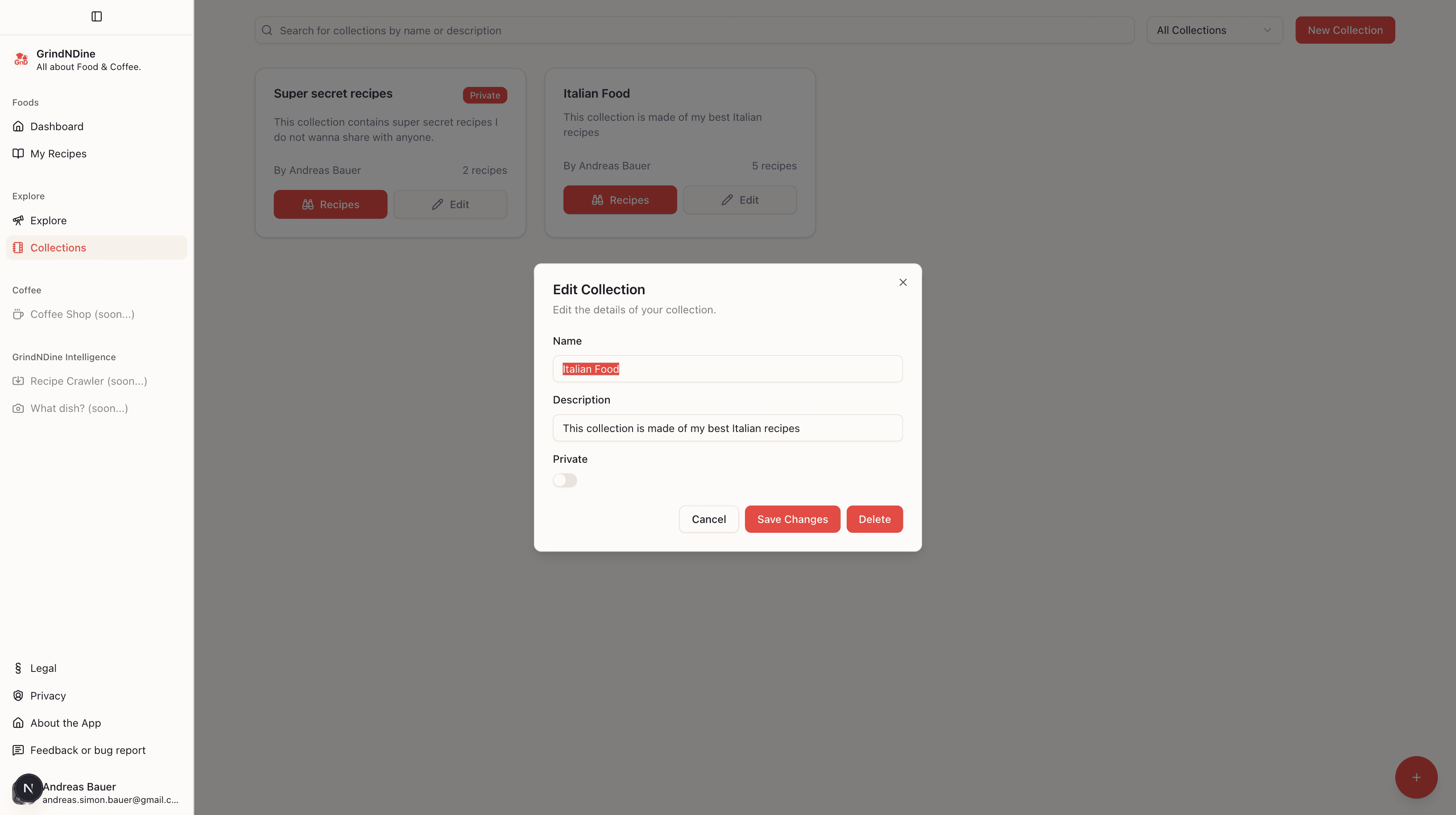
We're excited to announce a new feature that allows you to organize your recipes into collections. This update enhances recipe management and makes it easier to access your favorite dishes.
Introduction
This post introduces the new feature of organizing recipes into collections. It explains how this enhancement improves recipe management and accessibility.
How to create and manage collections
- Creating Collections: Navigate to the "Collections" tab in the app and click on "Create New Collection". Give it a name and description to get started. You can set the collection as public or private so only you can see it.
- Adding Recipes: While viewing a recipe, click on the "Add to Collection" button. Select the desired collection. You also can add multiple recipes to a collection at once from the recipe list view.
- Editing Collections: Go to the "Collections" tab, select a collection, and click "Edit". You can change the name, description, and privacy settings.
- Viewing Collections: Access your collections from the "Collections" tab. Click on any collection to view all the recipes it contains and perform a search within that collection.
Benefits of using collections
- Better Organization: Group related recipes together for easy access.
- Quick Access: Find your favorite recipes faster by browsing through collections.
- Sharing: Share public collections with friends and family.
Wrap-up
We hope you enjoy using the new collections feature to organize your recipes better. As always, we welcome your feedback and suggestions for future improvements. Happy cooking!
— Andreas